Alcatel-Lucent OTNS SmartApp5.1.2
Publisher Description
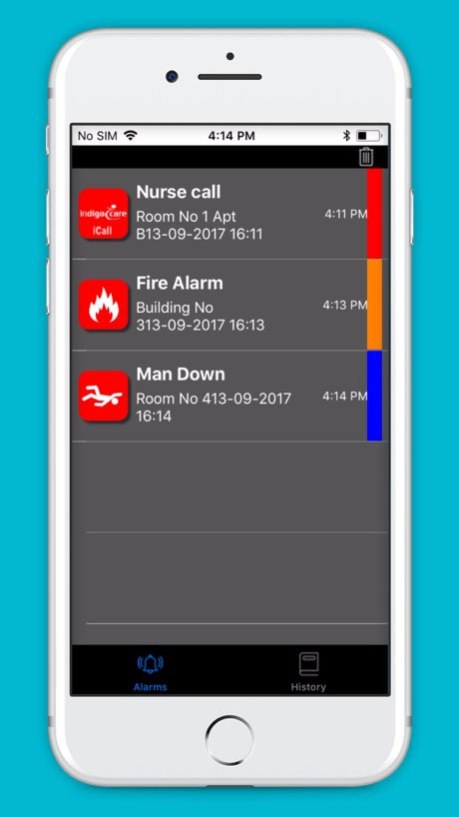
Alcatel-Lucent OTNS SmartApp
Alcatel-Lucent Enterprise OpenTouch(TM) Notification Service SmartApp
The OTNS SmartApp is the iOS client of the OpenTouch(TM) Notification Service, the extremely flexible alarm and notification platform from Alcatel-Lucent Enterprise.
FEATURES:
- receive alarms with control over sound, volume, icons, colors and priority
- send out personal (panic/SOS) alarms with GPS coordinates
- send and receive alarms through a WiFi or GSM network, public or private
- make & receive calls using GSM
- make & receive SIP H264 (video) calls
- read and send NFC tags for localization, date & time or access control
- view security camera footage
OPERATIONAL DETAILS:
- OTNS SmartApp licence per user required on the Alcatel-Lucent OpenTouch Notification Service. Please contact your Alcatel-Lucent Business Partner to get these licences.
- Minimum requirement: iOS 6.0
- iPhone, iPad and IPod Touch supported. Optimized for IPhone 5
The installation and administration guides are available on the Alcatel-Lucent Enterprise Business Portal
Support URL https://businessportal.alcatel-lucent.com
Version History Added iOS 11 support. 5.1.2 10/05/2017 - iOS 8 support;
- New icons;
- 64-bit support; 5.1.1 05/26/2015 4.4.4 01/20/2015
About Alcatel-Lucent OTNS SmartApp
The company that develops Alcatel-Lucent OTNS SmartApp is ALE International. The latest version released by its developer is 5.1.2.
To install Alcatel-Lucent OTNS SmartApp on your iOS device, just click the green Continue To App button above to start the installation process. The app is listed on our website since 2026-10-15 and was downloaded 42 times. We have already checked if the download link is safe, however for your own protection we recommend that you scan the downloaded app with your antivirus. Your antivirus may detect the Alcatel-Lucent OTNS SmartApp as malware if the download link is broken.
How to install Alcatel-Lucent OTNS SmartApp on your iOS device:
- Click on the Continue To App button on our website. This will redirect you to the App Store.
- Once the Alcatel-Lucent OTNS SmartApp is shown in the iTunes listing of your iOS device, you can start its download and installation. Tap on the GET button to the right of the app to start downloading it.
- If you are not logged-in the iOS appstore app, you'll be prompted for your your Apple ID and/or password.
- After Alcatel-Lucent OTNS SmartApp is downloaded, you'll see an INSTALL button to the right. Tap on it to start the actual installation of the iOS app.
- Once installation is finished you can tap on the OPEN button to start it. Its icon will also be added to your device home screen.
Program Details
System requirements
Download information
Pricing
Version History
version 5.1.2
posted on 2026-10-15
Version History Added iOS 11 support. 5.1.2 10/05/2017 - iOS 8 support;
- New icons;
- 64-bit support; 5.1.1 05/26/2015 4.4.4 01/20/2015
version 5.1.2
posted on 2026-09-03
Version History This app has been updated by Apple to prepare for watchOS 27 compatibility. No new features are included.
Added iOS 11 support. 5.1.2 10/05/2017 - iOS 8 support;
- New icons;
- 64-bit support; 5.1.1 05/26/2015 4.4.4 01/20/2015
version 5.1.2
posted on 2026-08-21
Version History This update from Apple will improve the functionality of this app. No new features are included.
Added iOS 11 support. 5.1.2 10/05/2017 - iOS 8 support;
- New icons;
- 64-bit support; 5.1.1 05/26/2015 4.4.4 01/20/2015
version 5.1.2
posted on 2017-10-05
This app has been updated by Apple to display the Apple Watch app icon.
Added iOS 11 support.
version 5.1.2
posted on 2017-10-05
Oct 5, 2017
Version 5.1.2
This app has been updated by Apple to display the Apple Watch app icon.
Added iOS 11 support.
